Free electronic signatures with document tracking
Upload a PDF, add signature fields and send one tracked link. Recipients can review and sign from any browser while Tracklytics shows you what captured their attention before they took action.
No credit card required. Five active documents on the Free plan. Fair-use and storage limits apply.
Typed or drawn signatures · Multiple signers · Mobile-browser signing · No app required
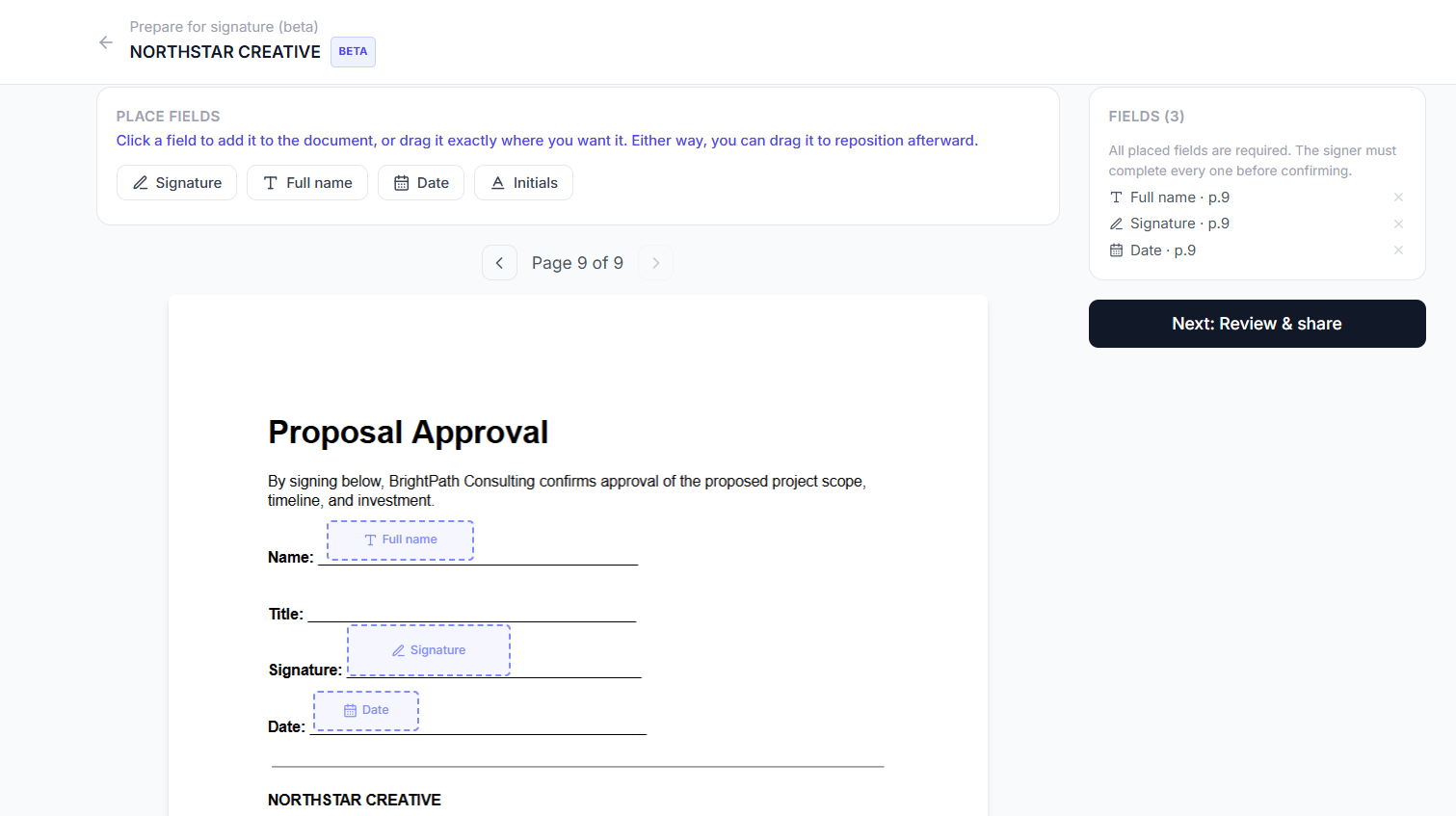
Placing signature, name, and date fields on a real PDF
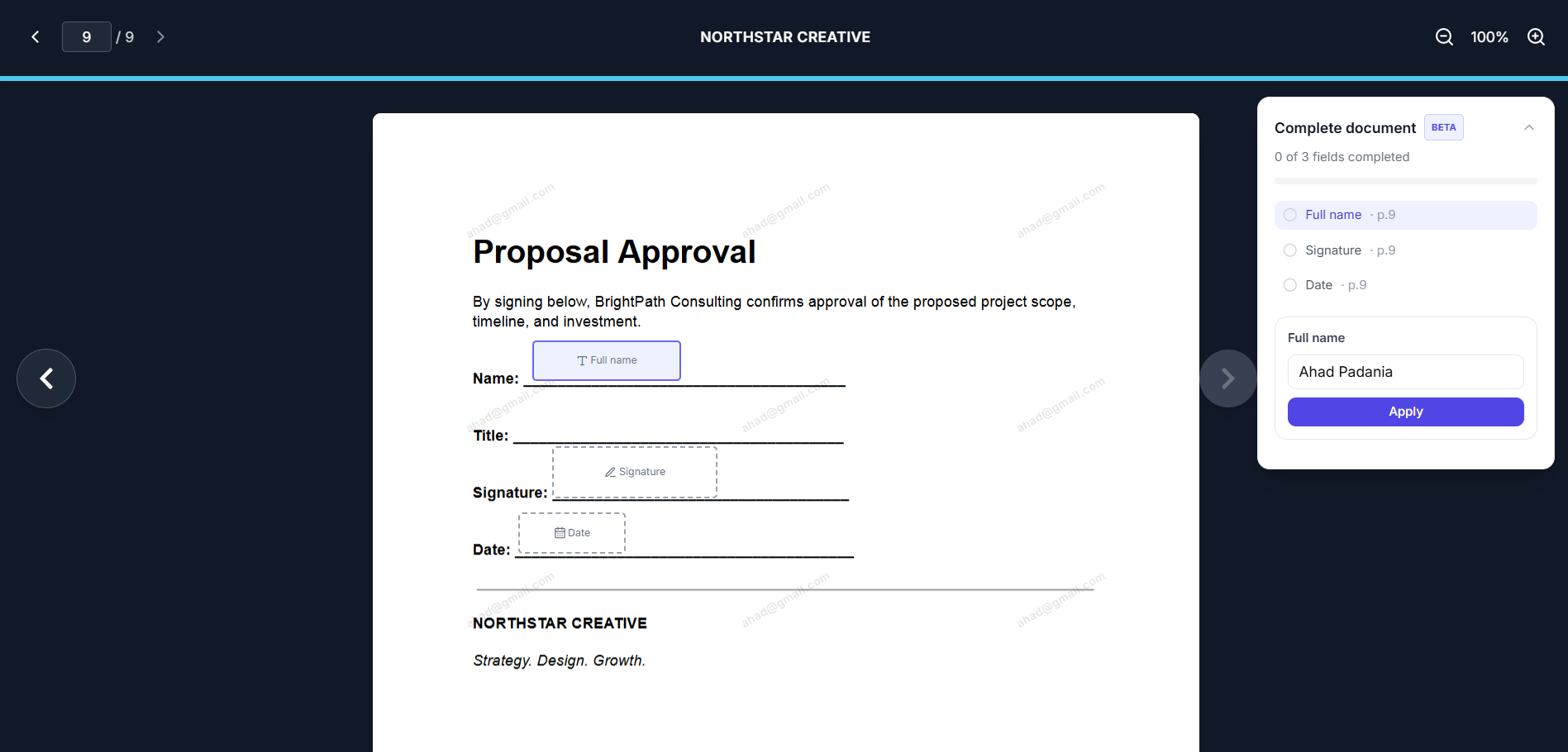
A recipient filling in their assigned fields
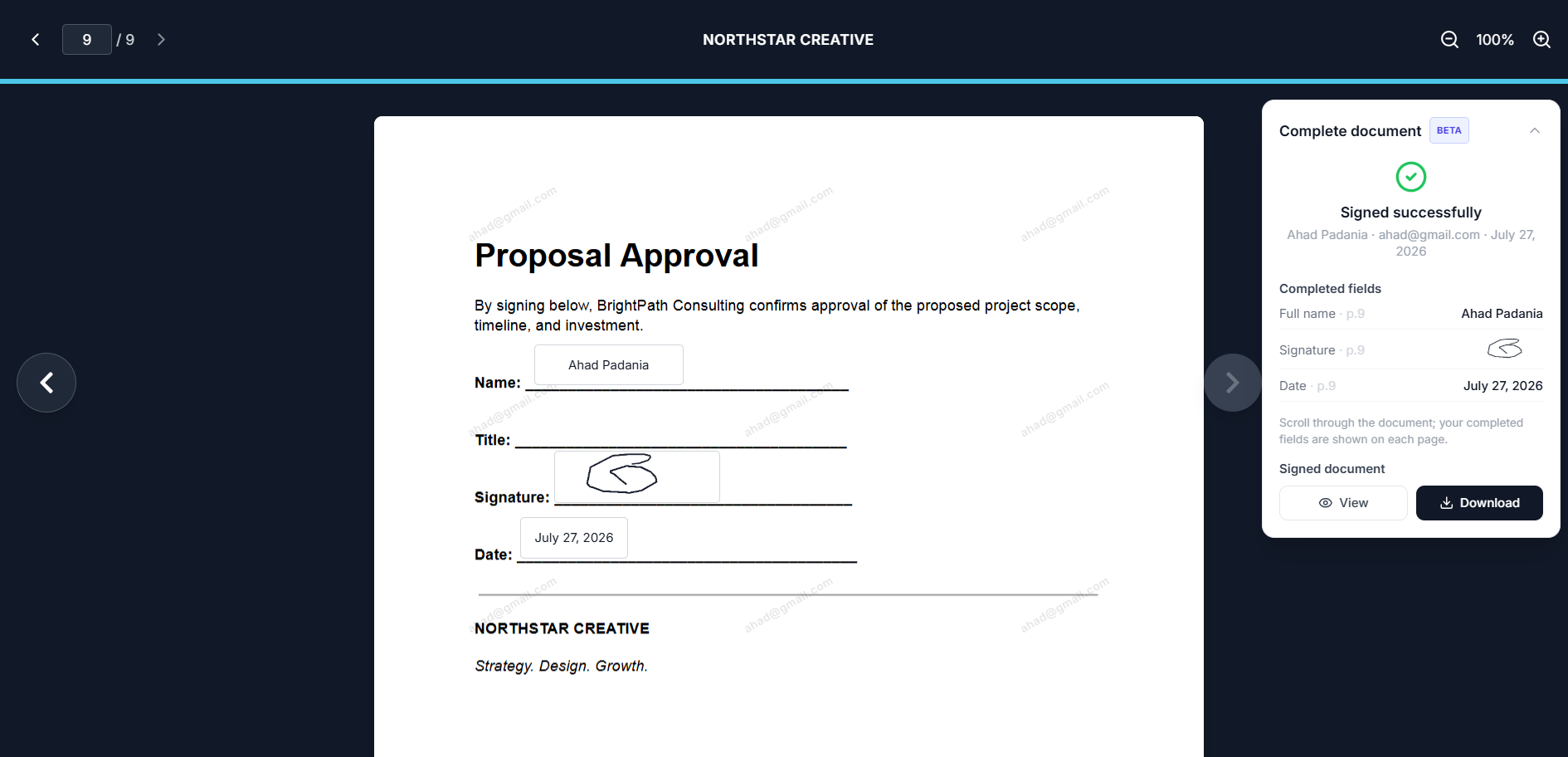
Signed, with the completed document ready to download
A signature shows the outcome. Tracklytics shows what led to it.
Most signing tools tell you whether a document was completed. Tracklytics connects the signature request with the document journey, helping you understand what the recipient reviewed, where they hesitated and when they returned.
Example engagement timeline
Ahad opened your proposal three times
Spent the most time reviewing pricing
Returned the following morning
Revisited the implementation page
Completed the signature request
Engagement signals provide context for a better follow-up. They do not prove a recipient's intent on their own.
Understand their attention
See which pages they reviewed, how long they spent and where they dropped off.
Recognize meaningful activity
Identify repeat visits, high-interest pages and engaged viewers without waiting for a reply.
Move from interest to action
Collect signatures without sending recipients into an unrelated signing platform.
From PDF to signed document in four steps
Upload your PDF
Add a proposal, agreement, NDA, statement of work, quote or another supported PDF.
Place the required fields
Add signature, initials, full-name and date fields directly onto the document.
Choose who can sign
Let the identified viewer complete the fields or assign each field to a specific signer.
Share one tracked link
Recipients open the document, review it and sign in their browser. Review activity, signature status and the completed PDF from Tracklytics.
Choose the signing workflow that fits your document
Let the identified viewer sign
You do not need to know the recipient's name beforehand. The viewer enters their name and email when opening the document. Tracklytics can prefill that information into the signing experience.
Entering a name does not automatically sign the document. The recipient must apply their signature, review the document and deliberately confirm it.
Best for
- General NDAs
- Client acknowledgements
- Quote approvals
- Consent forms
- Standard agreements
Assign specific signers
Add the people who need to sign and assign fields to each person. When a signer identifies themselves using the matching email, Tracklytics unlocks the appropriate fields.
Field colours help the document owner understand assignments. Completed signatures appear in standard black ink.
Best for
- Client and vendor agreements
- Multi-party approvals
- Founder and customer signatures
- Witnessed workflows where electronic signing is appropriate
- Internal approvals
Sign from a phone, without installing an app
Recipients can open, review and sign documents through the Tracklytics mobile website.
- Fit the PDF to the phone screen
- Move directly to the next required field
- Type a signature or draw with a finger
- Automatically populate the signing date
- Review the finished document before confirming
Mobile signing is still labeled Beta while we finish verifying the complete flow on real Safari and Chrome devices.
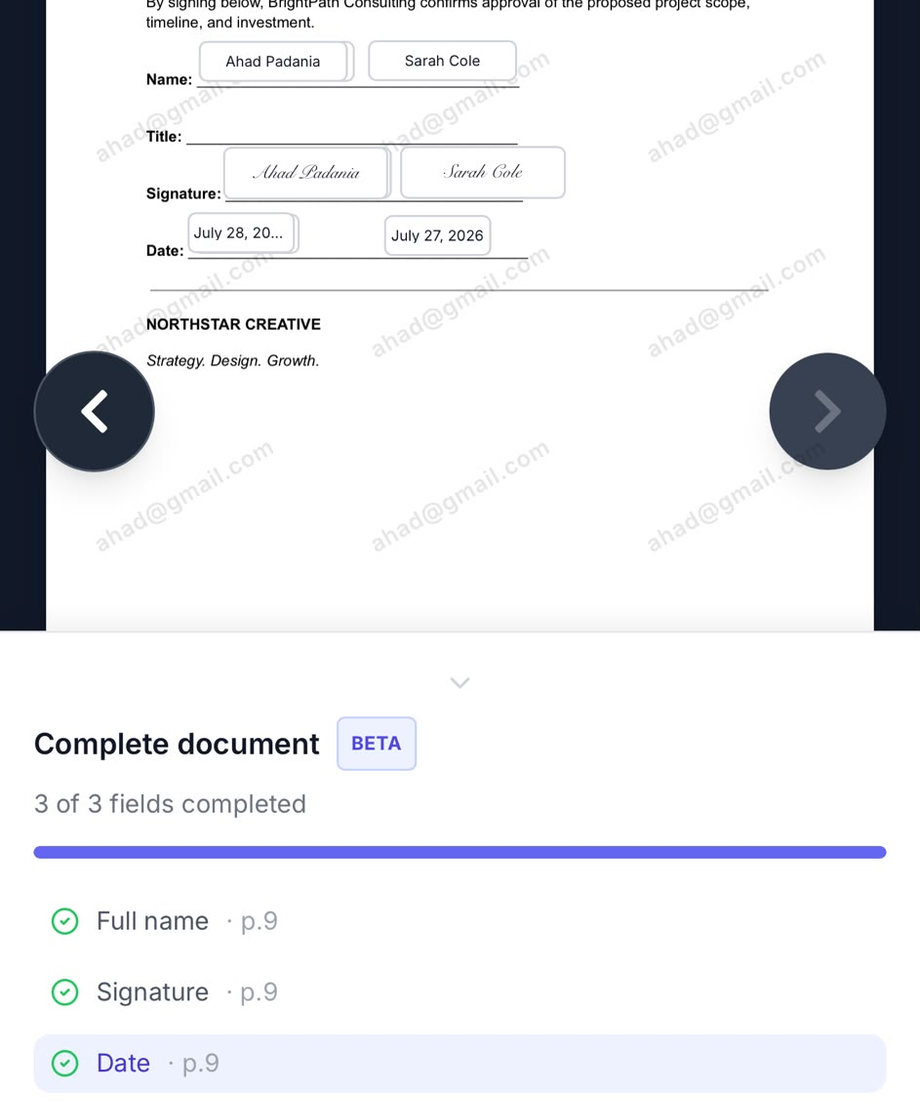
Tracking progress through required fields on a phone
One document. One link. One continuous experience.
Tracklytics does not send the recipient into a disconnected signing product. The document remains inside the same Tracklytics viewer used for document engagement.
On desktop
The PDF remains centred while a signing panel appears beside it.
On mobile
The PDF uses the available screen while signing controls open in a mobile-friendly panel.
Behind the scenes, Tracklytics keeps document engagement events separate from signing actions, so signature-field interactions never distort the normal document heatmap.
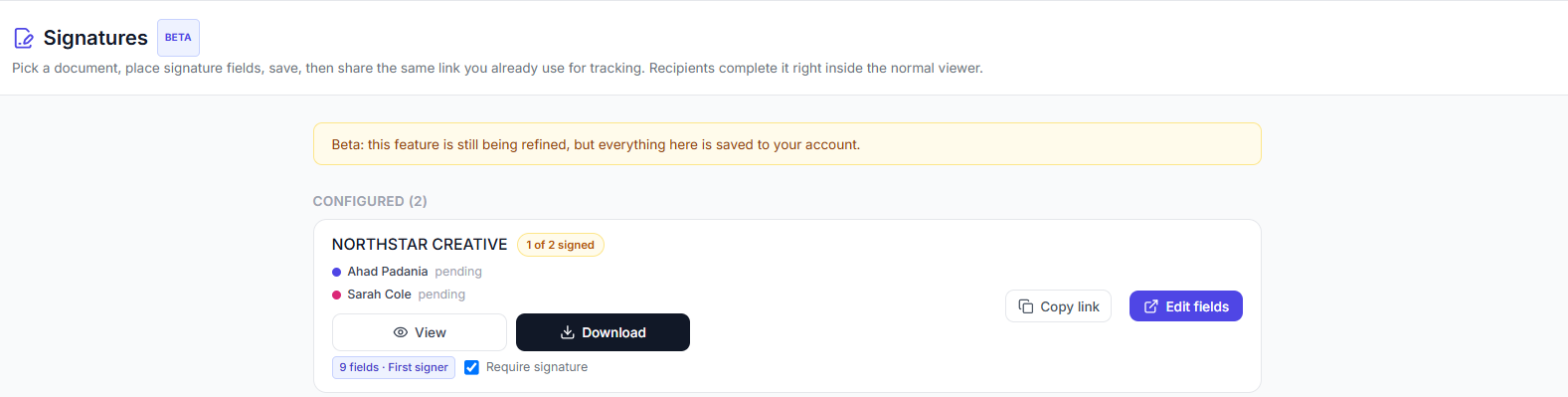
See who has signed from the dashboard, no separate tool
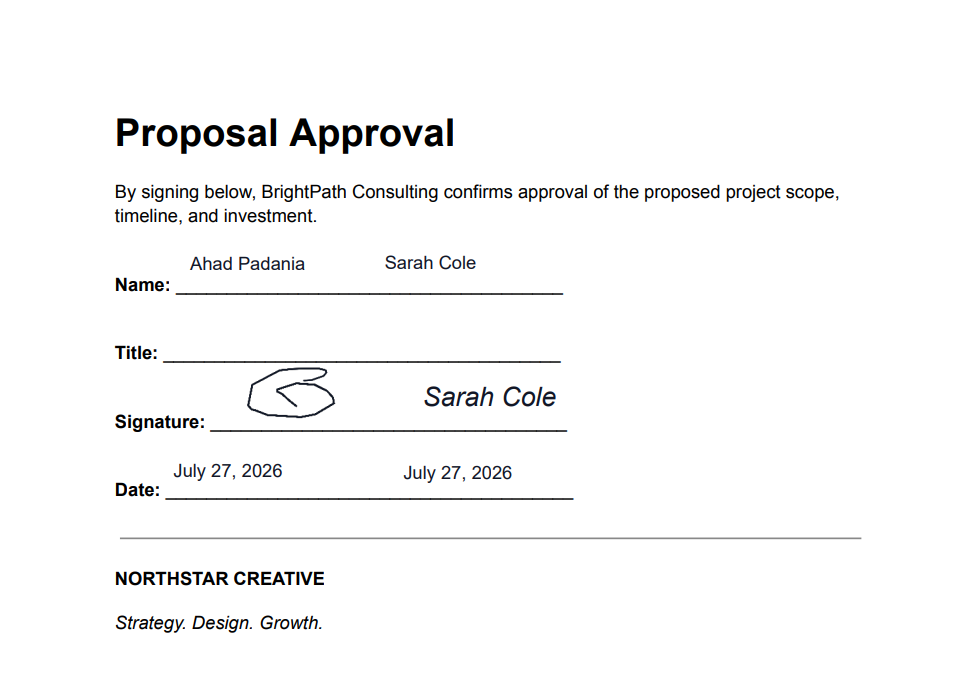
The completed PDF, every signer's fields filled in
Built for the documents that move business forward
Sales proposals
Understand what prospects reviewed before approving or signing.
Client agreements
Send agreements and collect signatures through one tracked link.
Statements of work
See whether clients focused on scope, timelines or pricing.
NDAs
Require an agreement before access or collect signatures inside the uploaded NDA.
Quotes and estimates
Let customers review and approve quotes online.
Agency contracts
Track engagement across proposals, retainers and service agreements.
Electronic signatures are available on every plan
You should not need an expensive subscription simply to collect a basic signature.
Free plan
- Five active documents
- Electronic signatures
- Typed and drawn signatures
- Identified-viewer signing
- Named signers
- Mobile-browser signing
- Basic document tracking
- Completed-PDF download
Electronic signatures are available within each plan's document, storage and fair-use limits.
Paid document intelligence
Upgrade when you need deeper visibility into viewer identity, page engagement, heatmaps, lead scoring, real-time alerts, AI follow-up recommendations and team-wide activity.
Signing is free. Understanding and acting on buyer behaviour is the paid value.
More than a signature request
| Capability | Tracklytics |
|---|---|
| Upload an existing PDF | Yes |
| Place signature fields | Yes |
| Typed and drawn signatures | Yes |
| Mobile-browser signing | Yes |
| Multiple signers | Yes |
| One shared tracked link | Yes |
| Track document opens | Yes |
| Measure page engagement | Yes |
| Review heatmaps and drop-off | Available on eligible plans |
| Identify high-intent viewers | Available on eligible plans |
| Generate follow-up suggestions | Available on eligible plans |
Clear controls for important documents
Configure how recipients access and complete each document.
Beta status
BetaTracklytics Electronic Signatures is currently in Beta. We are continuing to strengthen completed-document storage, audit records, document verification and signer authentication.
Electronic-signature questions
Are Tracklytics electronic signatures free?
Electronic signatures are available on every Tracklytics plan, including Free. Free accounts can maintain up to five active documents. Storage and fair-use limits apply.
Does the recipient need a Tracklytics account?
No. A recipient can open the shared document link, provide any required identity information and complete their assigned fields in the browser.
Can someone sign from a phone?
Yes. The signing experience is designed for mobile browsers, allowing recipients to type or draw their signature without installing an app.
Can multiple people sign one document?
Yes. The document owner can assign fields to multiple named signers or allow identified viewers to complete their own copies.
Can everybody use the same link?
Yes. Tracklytics can use one shared document link and match identified viewers to their assigned signature fields.
Can recipients type or draw their signatures?
Yes. Recipients can use a typed signature or draw one with a mouse, touchscreen or finger.
Does Tracklytics track the document before it is signed?
Yes. Depending on the owner’s plan and settings, Tracklytics can record document opens, viewing time, page engagement, scrolling, repeat visits and signature activity.
Can the owner download the completed PDF?
Yes. After completion, the signed PDF can be generated and downloaded. Tracklytics Electronic Signatures remains in Beta while additional server-side storage and audit features are being developed.
Are Tracklytics electronic signatures legally binding?
Electronic-signature requirements differ by jurisdiction, document type and required identity-assurance level. Tracklytics provides an electronic signing workflow but does not offer legal advice. Consult qualified counsel for regulated, high-risk or jurisdiction-sensitive documents.
What documents can I upload?
Tracklytics currently supports PDF documents.
Explore more
Free electronic signatures
For solo users and light signing volume, no card required.
Sign a PDF online
Add fields to a PDF you already have and send it out.
Sales proposals
Track drafts and follow-ups before the signature step.
Electronic signatures for NDAs
Require an agreement gate or collect a signed NDA inline.
Electronic signatures: the basics
Are electronic signatures legally recognized?
In the United States, the ESIGN Act and UETA give electronic signatures the same legal standing as a handwritten signature for most contracts and business records. In Canada, PIPEDA at the federal level and provincial legislation such as Ontario's Electronic Commerce Act generally recognize electronic signatures the same way. Most jurisdictions carve out exceptions for certain document types, such as wills or specific real estate transactions, where additional formalities may still apply. Tracklytics provides an electronic signing workflow, not legal advice, consult qualified counsel for regulated, high-risk, or jurisdiction-sensitive documents.
Electronic signature vs. digital signature
The two terms get used interchangeably, but they mean different things. An electronic signature is the broad legal concept, any electronic indication that a person intends to sign, whether that's a typed name, a drawn signature, or clicking to confirm. A digital signature is a specific technology, usually certificate-backed and built on public-key cryptography, that can be used to implement a tamper-evident electronic signature. Tracklytics offers an electronic signature workflow (typed or drawn), not a certificate-backed digital signature system, so it should not be described as providing every form of digital signature compliance.
What kind of documents work best?
Proposals, quotes, statements of work, NDAs, and standard client or vendor agreements are the most common fit, documents where you also want to know how the recipient engaged with the content before they signed, not just that they signed. For regulated contracts, real estate transactions, or documents with strict identity-verification requirements, check with counsel on what level of signature assurance your specific situation requires.
See what they read before they sign
Upload your PDF, add signature fields and share one intelligent link.
No credit card required. Five active documents on the Free plan.