Sign a PDF online and send it for signature
Turn an existing PDF into a browser-based signing experience. Add the required fields, choose who must sign and share one tracked link, without asking the recipient to download an app.
No credit card required. Five active documents on the Free plan. Fair-use and storage limits apply.
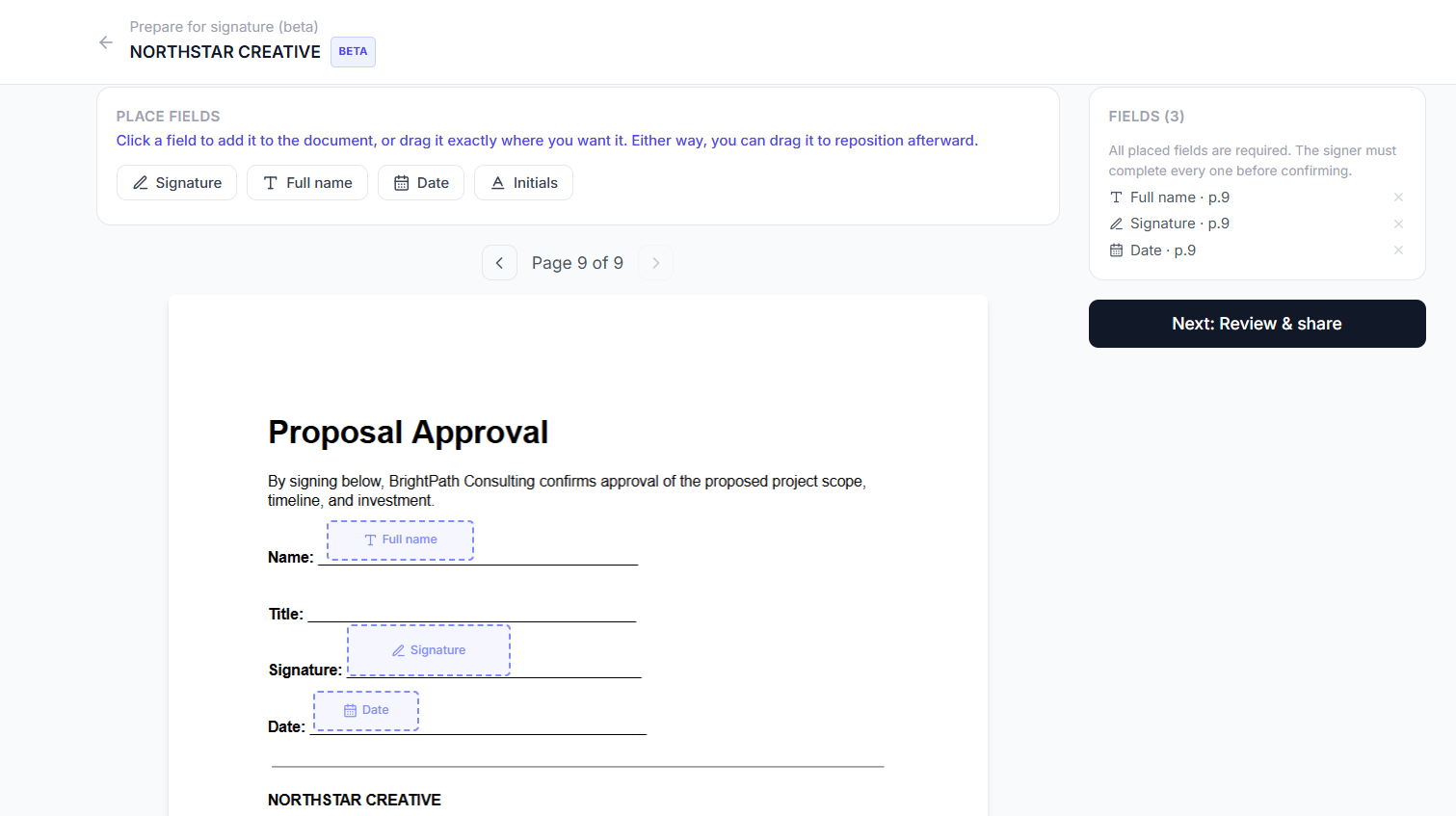
Placing signature, name and date fields on the uploaded PDF
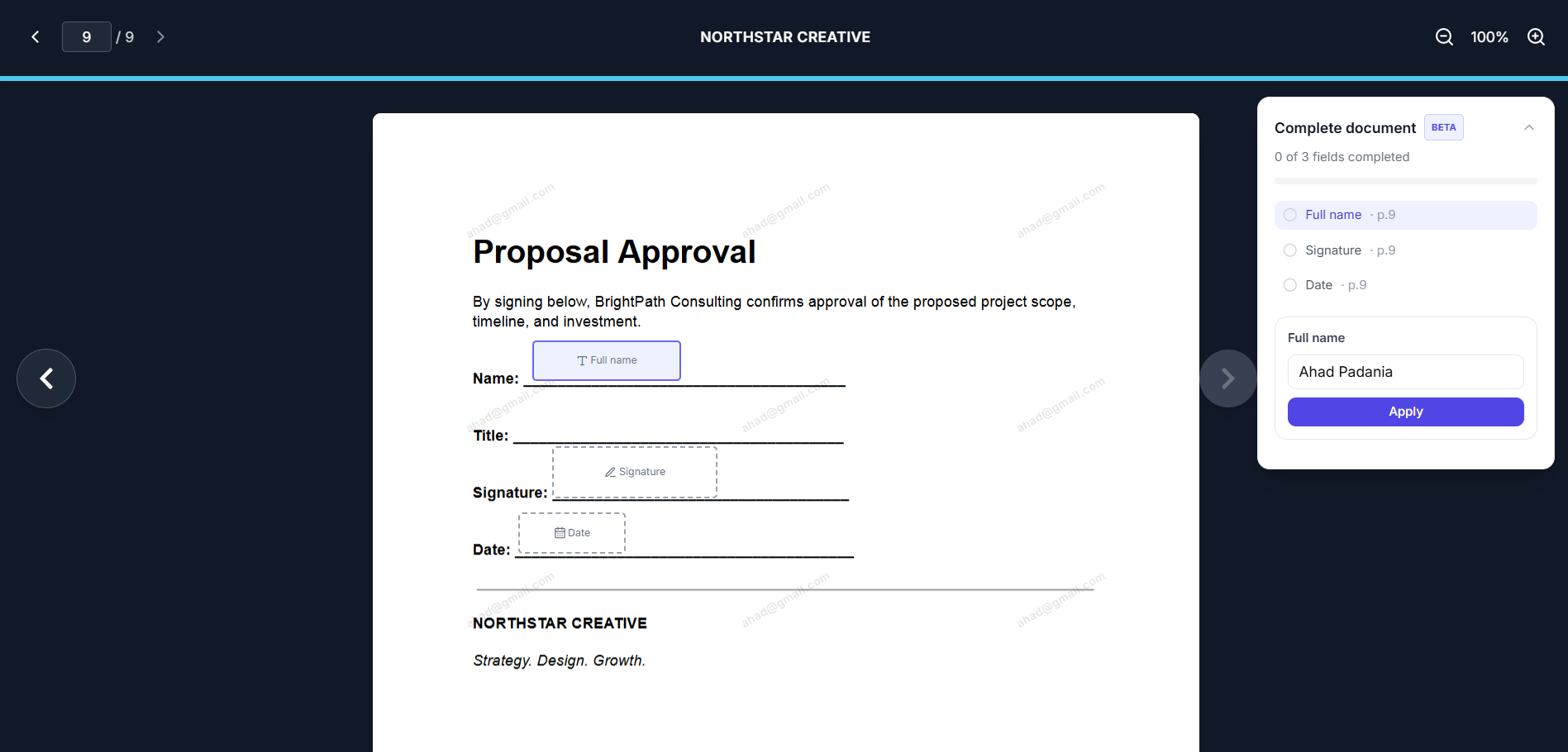
A recipient filling in a signature field on desktop
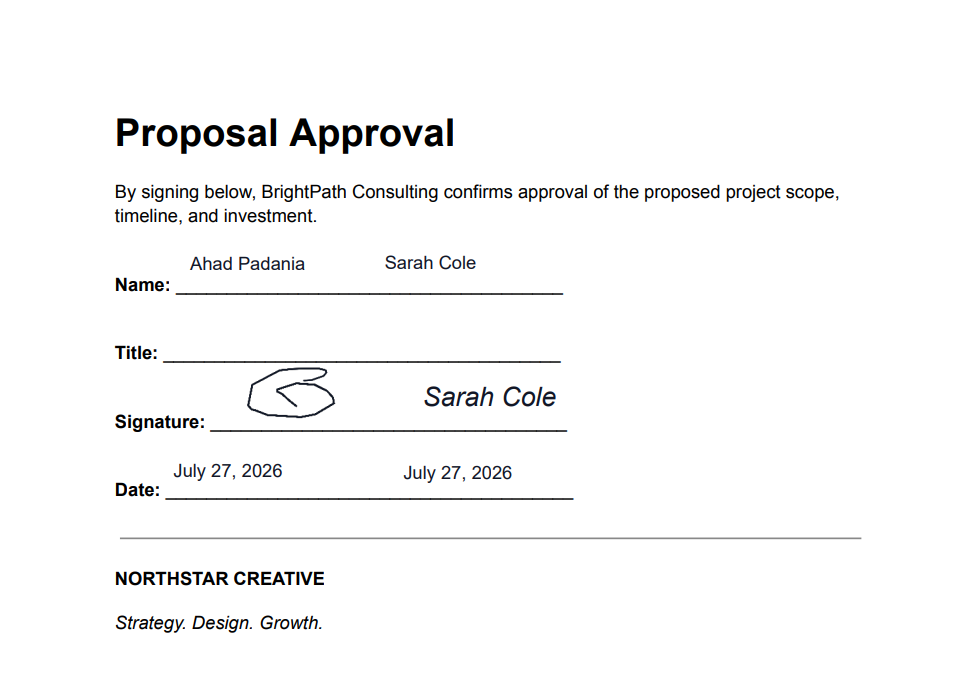
The exact PDF you uploaded, now completed
Keep the PDF you already created
You do not need to rebuild a proposal or agreement inside a new document editor. Upload the finished PDF, place fields on top of the existing pages and send it through Tracklytics.
Works well for
How to add a signature to a PDF online
Upload the PDF
Select the document you want to prepare for signature.
Add signature fields
Drag signature, initials, full-name and date fields onto the correct places in the document.
Assign the fields
Let the identified viewer complete the fields or assign them to named signers.
Share one link
Send the Tracklytics link by email, text, CRM or another communication channel.
Let the recipient review and sign
The recipient opens the PDF in a supported browser, completes the assigned fields and confirms the signature.
Review and download
Check the document status and access the completed PDF from Tracklytics.
Add the fields your workflow needs
Signature
Let the signer type a signature or draw one.
Initials
Collect initials beside specific terms or required acknowledgements.
Full name
Capture or confirm the signer's name.
Date
Populate the date associated with the signing action.
The recipient must deliberately apply and confirm the signature. Entering a name or email address alone does not sign the document.
Send the PDF to one person or several signers
For a simple request, let the identified viewer sign. For a multi-party document, add named signers and assign the correct fields to each person. Field colours help the document owner review assignments while setting up the PDF.
If the sender must also sign, add the sender as a named signer and assign the appropriate fields before or during the signing sequence supported by the workflow.
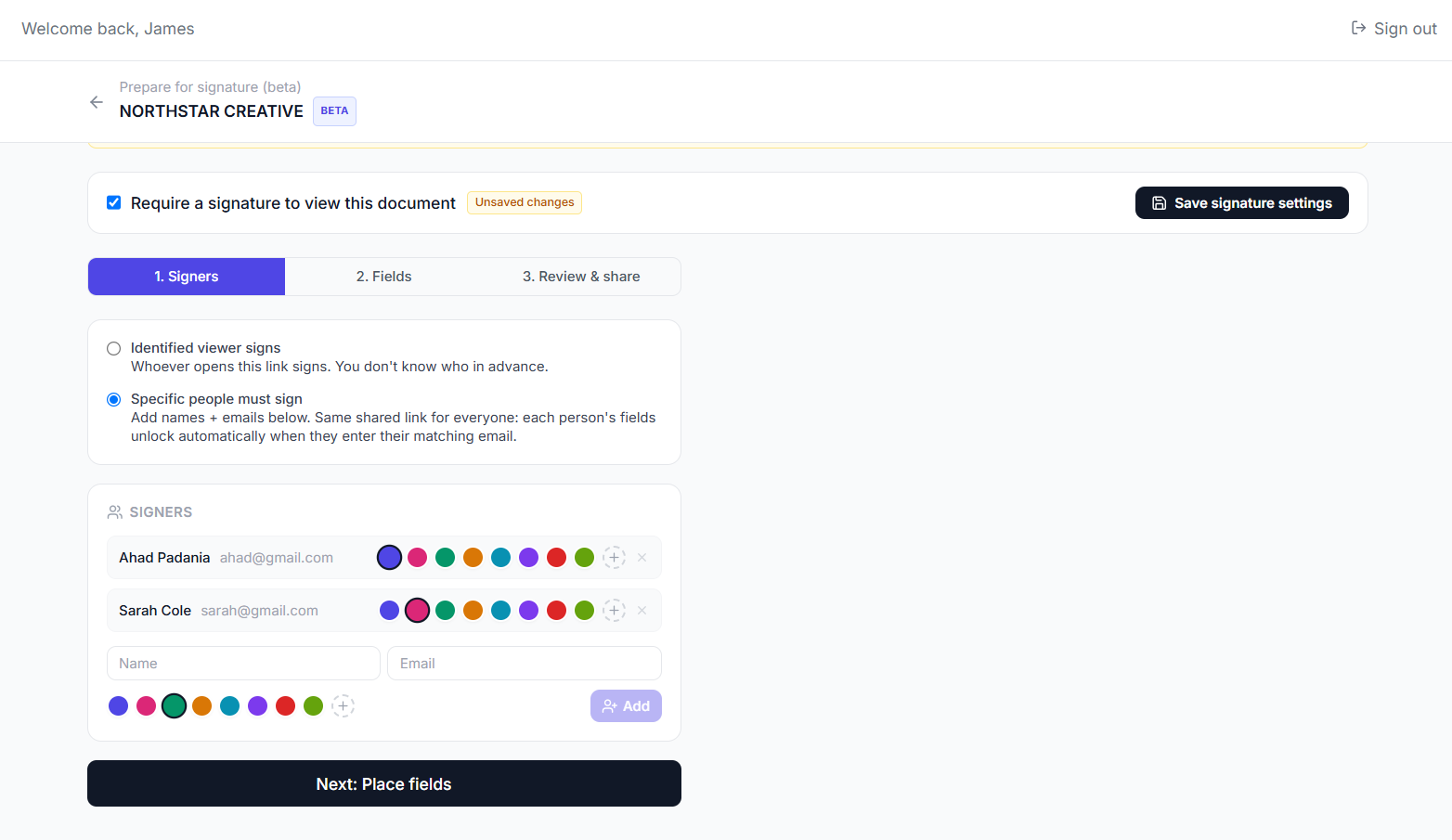
Adding named signers before placing fields
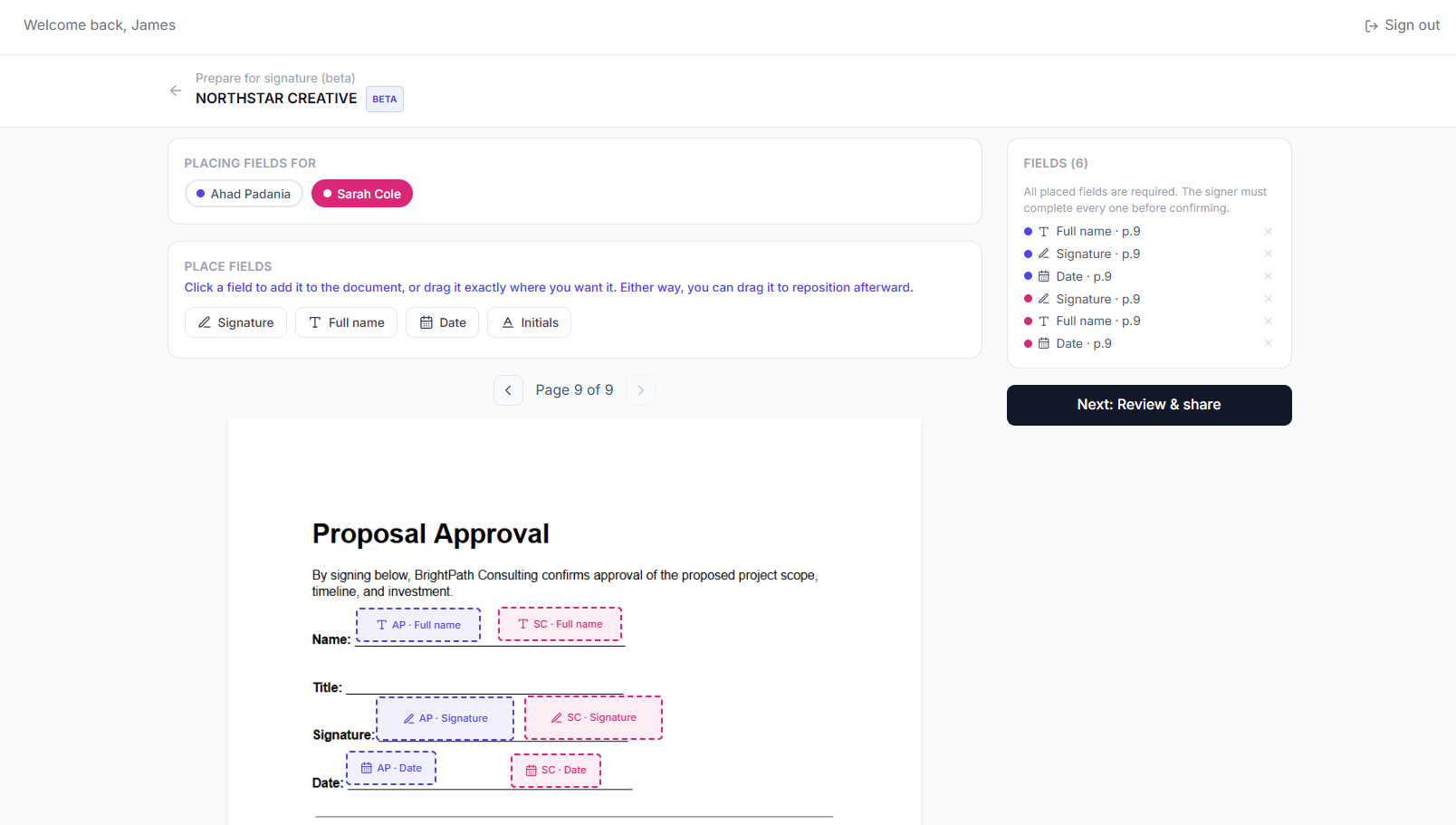
Each signer's fields are colour-coded and tracked separately
Sign a PDF from a phone
A recipient can open the shared link and sign through the Tracklytics mobile website. They can fit the PDF to the screen, move between required fields, type a signature or draw with a finger, and review the document before confirming.
Mobile-browser signing is in Beta while Tracklytics continues real-device testing across supported Safari and Chrome experiences.
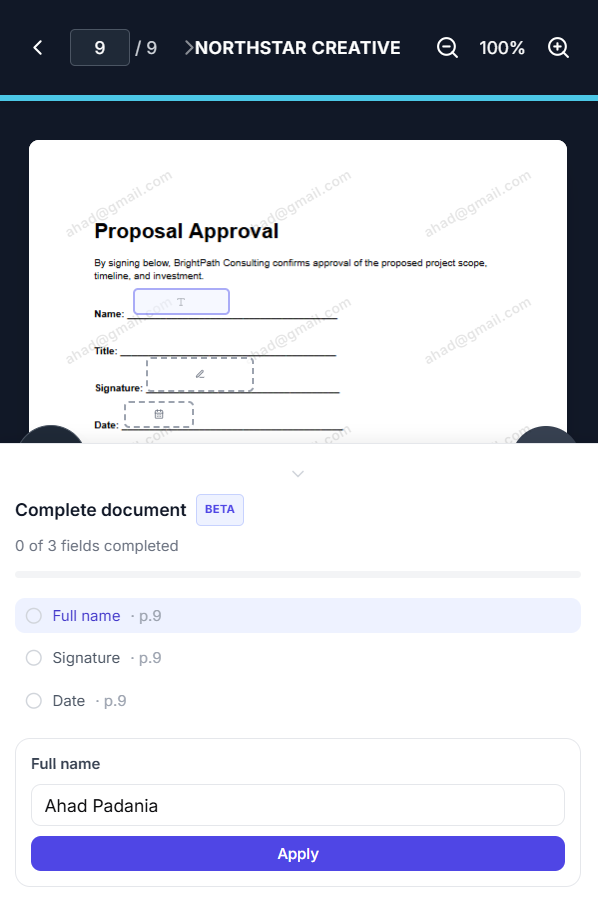
Signing a PDF from a mobile browser
See what happened before the PDF was signed
Tracklytics is more than a field layer placed on a PDF. It can connect the signing request with document engagement so you know whether the recipient opened the file, returned later and focused on particular pages. The depth of analytics depends on the selected plan.
Basic tracking
Confirm that the shared document was opened and follow its signature status.
Advanced document intelligence
Eligible paid plans can provide deeper page engagement, heatmaps, viewer identity, intent signals, alerts and follow-up recommendations.
Online PDF-signing questions
Do I need to convert my PDF into another format?
No. Tracklytics is designed to place signing fields onto the PDF you upload.
Does the recipient need to download the PDF before signing?
No. The recipient can review and sign through the shared browser link, then the completed document can be accessed after the workflow is finished.
Can I send the same PDF link to multiple people?
Yes. Use named signers and signer matching when different people must complete different fields.
Can the sender sign the PDF too?
Yes. Add the sender as a signer when the document requires signatures from both sides.
Can I sign on an iPhone or Android phone?
Tracklytics supports mobile-browser signing in Beta. Device and browser behaviour should be verified before relying on it for a high-stakes workflow.
Is a typed signature the same as a digital signature?
No. A typed or drawn signature is an electronic-signature method. A digital signature usually refers to a certificate-backed cryptographic process. Tracklytics currently provides an electronic-signature workflow, not a certificate-backed digital-signature system.
What if I only want to paste a signature into a personal PDF?
Tracklytics is designed for preparing, sharing, tracking and completing business PDFs. Its strongest value appears when another person must review the document or when you need visibility into the document journey.
Explore more
Electronic signatures with document tracking
See the full feature set, including recipient activity.
Free electronic signatures
No-cost plan for basic PDF signing.
Send a sales proposal for signature
Track proposal activity before and after signing.
Send an NDA for signature
Gate access or collect a signed NDA inline.
Turn your PDF into a tracked signing experience
Add the fields, send one link and let the recipient review and sign online.